Understand what you are browsing
Opera AI can use the active webpage or the context of an entire Tab Island to answer questions that stay relevant to the browsing session you are working in.
 Opera
Download now
Opera
Download now
Opera AI is built directly into Opera Browser. It can use the context of your active webpage or Tab Island to answer questions, generate text and images, analyze PDFs and pictures, and work with browser content without a separate AI extension.
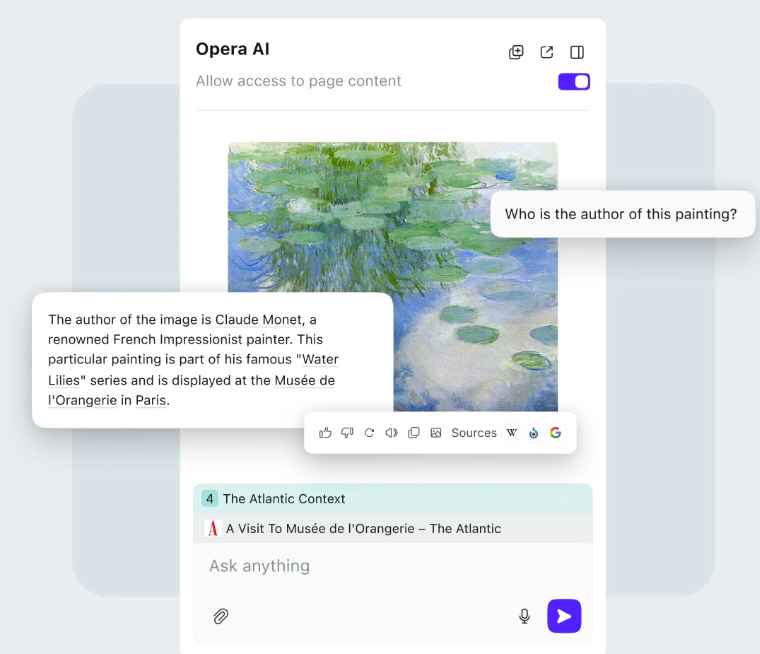
Opera AI works with the content already open in your browser, so you can ask about pages, create content and analyze files without rebuilding the context in another tool.
Opera AI can use the active webpage or the context of an entire Tab Island to answer questions that stay relevant to the browsing session you are working in.
Ask questions, summarize content, draft text and work with information in more than 50 languages directly from Opera’s browser AI interface.
Create images from text prompts, upload pictures for analysis, and work with PDF content while continuing the conversation around the file.
Core Opera AI can be used without creating or signing in to an Opera account. The first time you use it, you only need to accept the applicable service terms.
Click Ask AI near the top-right of Opera, or use Ctrl+O on Windows and Linux or Cmd+O on macOS. Allow page context when you want Opera AI to work with the active webpage or the Tab Island it belongs to.
Summarize the current page, explain a difficult section, compare claims or identify the parts worth reading more closely.
Upload a file, extract the important information, ask follow-up questions and continue working from the same browser conversation.
Generate a draft or image from a prompt, then refine the wording, structure, visual direction or level of detail through follow-up requests.
The browser AI can stay connected to the content you are already viewing, from a webpage or Tab Island to uploaded files and supported YouTube video tasks.
Ask about the current page or let Opera AI use a Tab Island as context when several related tabs belong to the same research, planning or comparison task.
Upload PDFs or images to extract information, interpret visual content and ask questions about what is contained in the file.
Opera AI can work with YouTube video tasks including translation and can return answers across more than 50 languages, keeping more content work inside the browser.
No. Core Opera AI is available without an Opera account. Update Opera to a version that includes the current AI experience, click Ask AI, and accept the service terms the first time you use it.
No. Opera AI is Opera’s native browser AI. ChatGPT and Gemini are separate AI services that Opera makes accessible from the sidebar.
Yes. Opera AI can use the active webpage as context and can also work with the context of the Tab Island that page belongs to when page context is allowed.
Yes. Opera AI supports PDF and image analysis. You can upload supported files from the chat input and continue asking questions about the material.
Yes. Describe the image you want in the Opera AI chat and send the prompt. Image-generation quotas can differ by account state or current Opera limits, so use the limits shown in Opera for the latest allowance.
Use Ctrl+O on Windows or Linux and Cmd+O on macOS to open Opera AI. You can also click Ask AI near the top-right of the browser.
OPERA AI
Install or update Opera to ask questions with webpage context, generate images, analyze files and use Opera AI without adding a separate browser extension.
